Pixel Art Outsourcing: How to Find and Work With Pixel Artists
Complete guide to pixel art outsourcing - finding pixel art studios, writing effective briefs, managing sprite production, and what pixel art costs in 2026.
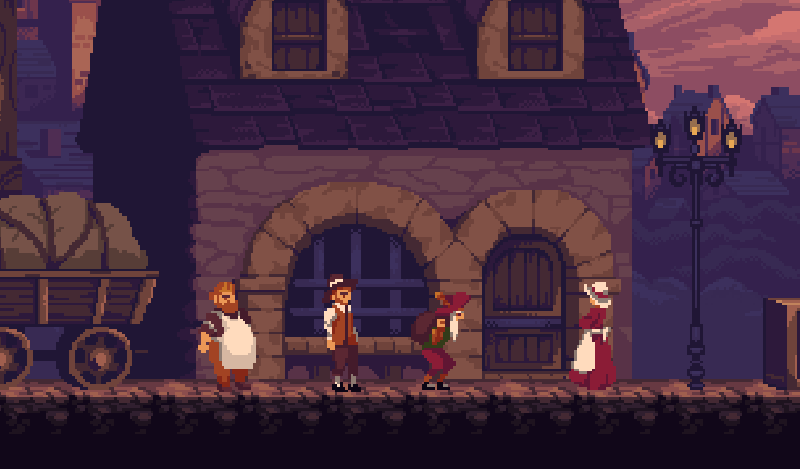
Pixel art outsourcing sits in a unique position in the game art market. It’s one of the oldest digital art forms, one of the most technically demanding to execute well, and increasingly in demand as developers recognize that authentic pixel art is far harder to produce than it looks.
This guide covers how to source pixel art production externally - finding qualified pixel artists and studios, writing briefs that produce authentic results, managing sprite production at scale, and understanding what to budget.
What Pixel Art Outsourcing Actually Requires
Before approaching the market, understand what makes pixel art a specialized skill distinct from other 2D art forms.
Pixel art operates at the pixel level. Every dot is placed intentionally. Work produced at 16×16 or 32×32 pixels requires a completely different skillset than painting at 1000×1000 pixels - you can’t use pressure-sensitive brushes, gradient tools, or blur effects. Everything is hand-placed pixel by pixel.
The technical demands include:
Color palette discipline - authentic pixel art uses limited palettes (8, 16, 32 colors) with specific techniques for color ramping. Artists who don’t understand palette discipline produce noisy, muddy work.
Anti-aliasing by hand - smooth-looking curves and edges in pixel art are achieved through strategic pixel placement, not software filters.
Animation at low resolution - animating a 32×32 character requires extreme economy of movement. Each animation frame must read clearly despite having very few pixels to work with.
Tile design for seamless environments - tileset work requires understanding of how tiles connect at their edges. A pixel art tileset that looks great as individual pieces but produces visible seams or repetition artifacts is unusable in production.
Not every 2D artist can produce authentic pixel art. When sourcing, verify that the portfolio work is genuine pixel art produced at the native resolution you need - not high-resolution illustration downscaled to look pixelated.
Types of Pixel Art Projects That Outsource Well
Sprite Production at Scale
Once a pixel art style is established, producing large quantities of sprites - enemy variations, item icons, environment props - is well-suited to external production. The style is defined; the artist needs to execute within it consistently.
Sprite production batches work best when you provide:
- Multiple approved examples in your exact target style
- The exact output resolution (16×16, 32×32, 64×64, etc.)
- Your color palette as a file (PNG palette strip or Aseprite palette)
- Animation frame counts for each sprite type
Tileset Production
Environment tilesets - floors, walls, decorative elements - are high-volume, well-defined work. An established style guide and a few approved prototype tiles give an external artist enough direction to produce full tileset expansions.
Character Sprites and Animation
Player character sprites with animation sets are core game assets that benefit from specialist skill. A freelancer who specializes in character sprites at your target resolution will produce better work than a generalist 2D artist who occasionally does pixel art.
Character sprite outsourcing works best when you have the static design approved before briefing animation - animating a design that hasn’t been finalized leads to expensive revision cycles.
Icon and UI Production
Game icons (inventory items, abilities, status effects) in pixel art require fine detail work in very small formats. This is one of the most technically demanding pixel art categories because each icon must read clearly despite being displayed at 16×16 or 32×32 pixels.
Finding Qualified Pixel Art Studios and Freelancers
The pixel art market is primarily composed of skilled freelancers rather than dedicated studios. This is partly historical - pixel art originated in an era of individual developers - and partly because the production volume for pixel art games rarely justifies a studio’s overhead.
Where to Look
ArtStation - search specifically for “pixel art” and review portfolios carefully. Many artists list pixel art as a skill but produce work that doesn’t hold up to scrutiny at the intended output resolution.
itch.io community - itch.io hosts a large community of indie developers and pixel artists, many of whom take commissions and post pixel art packs for sale. The community is active and referrals flow naturally through developer discussions.
Pixel art communities - Lospec.com maintains a pixel art community and gallery. PixelJoint.com is a dedicated pixel art forum with a large archive of work and active members who take commissions.
Twitter/X pixel art community - the #pixelart hashtag is active; many professional pixel artists share work in progress and commission availability.
Evaluating Pixel Art Portfolios
When evaluating pixel art, look for:
Native resolution work - verify the work was produced at the resolution shown, not downscaled from higher-resolution art. Ask the artist directly if you’re uncertain.
Palette discipline - strong pixel art uses limited, carefully chosen palettes. Work that uses hundreds of colors or heavy gradient tools is not authentic pixel art.
Animation quality - if you need animation, look specifically at animation examples. Static pixel art and animated pixel art are related but different skill sets. A walk cycle should feel alive and characteristic - each frame should read clearly at game speed.
Consistency across a production run - ask to see examples of batch work: a full tileset, a complete icon set, or a sprite sheet rather than just selected highlights. Production consistency is what you’ll actually receive.
Writing a Pixel Art Brief That Works
Pixel art briefs require specific technical information that general 2D briefs don’t need.
Essential Technical Information
Output resolution - specify exact pixel dimensions. “16×16 character sprite” is clear; “small sprite” is not. If you need multiple resolutions, list them all.
Color palette - if you have an existing palette, deliver it as a file. If you’re defining a new palette, work with the artist on this before production begins. A mismatched palette on even a single asset breaks visual cohesion across your entire game.
Target platform - retina displays, mobile screens, and CRT-emulation effects all have different implications for pixel art production. A sprite that looks correct on a 1:1 pixel mapping may need to be designed differently for an LCD at 2× or 3× scaling.
Animation specifications - frame count, frame rate (FPS), loop vs. non-loop, and what actions to animate (idle, walk, run, attack, death are typical starting points). Every unspecified animation variant is a scope addition waiting to happen.
File format and delivery - most pixel artists work in Aseprite; specify whether you want the source .ase file alongside PNG exports. If you need sprite sheets rather than individual frame PNGs, specify the layout format.
Style Direction for Pixel Art
Pixel art style references are harder to find than for other art styles because the style is so resolution-specific. A 16×16 character reference is not useful for a 64×64 character brief.
Provide:
- Examples at your exact target resolution from games with a similar aesthetic
- Your existing game assets, if any exist
- Color palette - this is your single most powerful style specification in pixel art
Negative references matter too. If your game should feel like classic 16-bit RPGs rather than modern indie pixel art, or vice versa, document that distinction.
Managing Pixel Art Production
Pixel art production has shorter iteration cycles than most 2D art because the scale is small. A round of revisions on a 32×32 sprite takes less time than a revision on a detailed illustration.
However, this speed advantage disappears if scope is poorly managed. Catching a style error on a single sprite and fixing it before it propagates across 50 sprites is far cheaper than revising 50 sprites.
Calibration sprite first. Always have the artist produce one approved calibration sprite before a full batch. This is the single most effective quality control step in pixel art outsourcing.
Review at native resolution. Zoom levels in design software can make mediocre pixel art look acceptable. Review deliverables at the actual size they’ll appear in your game.
Palette enforcement is critical. Request that the artist confirms they are working with your provided palette, not approximating it. Off-palette pixels are easy to introduce accidentally and break visual consistency.
What Pixel Art Outsourcing Costs
Pixel art pricing reflects the skill level required rather than the physical size of the output. Work produced at small sizes is not cheaper than large-format art - it’s often more demanding per-pixel.
| Asset Type | Budget Range | Mid-Tier Range |
|---|---|---|
| 16×16 icon set (20 icons) | $150–$400 | $400–$900 |
| 32×32 character sprite (static) | $80–$200 | $200–$500 |
| 32×32 animated character (5–6 animations) | $400–$900 | $900–$2,000 |
| 64×64 character with animation set | $600–$1,500 | $1,500–$3,500 |
| Tileset (16×16, 40+ tiles) | $300–$700 | $700–$1,500 |
| Background scene (low resolution, layered) | $200–$600 | $600–$1,500 |
These ranges reflect the current pixel art freelancer market. Top-tier pixel artists with strong animation portfolios and consistent production track records often command rates at or above the mid-tier range.
For detailed cost comparisons across 2D art types, see the game art cost guide.
Common Mistakes in Pixel Art Outsourcing
Treating pixel art as cheap art because the pixels are small. Skilled pixel art takes more time per pixel than most digital painting because every element is manually placed. Budget accordingly.
Not providing a palette file. Giving a style reference without providing your actual color palette is the most common cause of style mismatch in pixel art. The palette is the style.
Accepting portfolio samples that don’t match your target resolution. A beautiful 64×64 character portfolio doesn’t tell you what the artist will produce at 16×16. Always request samples at your specific target dimensions.
Skipping the calibration sprite for batch work. The calibration step feels like overhead when you’re eager to start production. It saves far more time than it costs.
Confusing “pixel art aesthetic” with authentic pixel art. Some high-resolution illustration uses visual effects to look like pixel art without actually being produced at pixel-level constraints. This distinction matters when the assets will be displayed at game resolution.
Pixel art outsourcing works best with artists who have deep, specific experience in your target resolution and style. The verification effort upfront - checking portfolios at native resolution, confirming palette discipline, running a calibration piece - is the investment that separates successful pixel art partnerships from disappointing ones.
For broader guidance on 2D outsourcing, see our 2D game art outsourcing guide. For indie developers working with limited budgets, see game art outsourcing for indie developers. For a comparison of all major game art styles and their outsourcing complexity, see the video game art styles guide.